

Luxury AI Studio Portrait Prompt for ChatGPT (Face Lock Guide 2026)
Luxury AI Studio Portrait Prompt for ChatGPT: Create Stunning Double Portrait Photos with Face Lock
Artificial Intelligence has completely changed the way we create professional portraits. What once required an expensive photography studio, designer wardrobe, professional lighting setup, and hours of Photoshop editing can now be achieved in minutes using ChatGPT’s AI image generation capabilities.
One of the most popular AI portrait styles in 2026 is the Luxury Double Portrait Studio Effect—a premium editorial look where the subject stands confidently in front of a large monochrome portrait of themselves. The result resembles a magazine cover or luxury corporate branding campaign.
In this guide, you’ll learn exactly how to recreate this look using ChatGPT and a single reference photo. I’ll also share a professional Face Lock prompt that preserves your identity while transforming your image into a high-end fashion portrait.
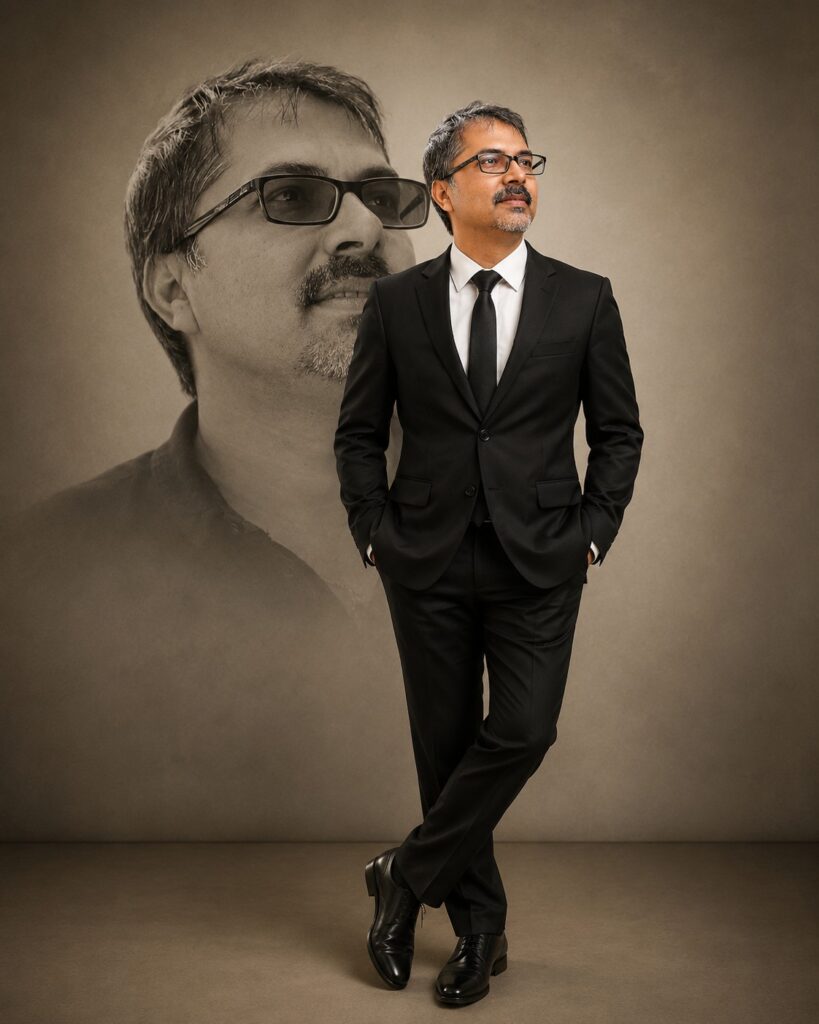

What Is the Luxury Double Portrait Style?
The concept is beautifully simple.
Instead of placing your subject against an ordinary background, AI creates a massive black-and-white artistic portrait behind them. The foreground features a full-body studio shot, while the background adds depth, personality, and cinematic elegance.
The combination produces a luxury editorial appearance that’s commonly seen in:
- Business branding
- CEO portraits
- LinkedIn profile photos
- Luxury fashion magazines
- Personal branding websites
- Photography portfolios
- Corporate advertisements
- Premium social media content
The effect instantly makes an ordinary portrait feel expensive and professionally produced.
Why This Style Looks So Premium
Professional photographers have used layered compositions for decades because they naturally draw attention to the subject.
The oversized monochrome portrait creates visual depth without distracting from the person standing in front.
Combined with:
- Soft studio lighting
- Luxury tailored clothing
- Clean beige backgrounds
- Cinematic shadows
- Editorial composition
…the final image feels like it belongs in Vogue, GQ, or a luxury advertising campaign.
Why Use ChatGPT Instead of Traditional Editing?
Creating this effect manually requires:
- Professional photography
- Photoshop masking
- Layer blending
- Studio lighting
- Color grading
- Retouching
With ChatGPT’s AI image editing, most of this work is automated.
Simply upload one good-quality portrait, paste the prompt, and allow the AI to generate the entire composition while keeping your facial identity intact.
The Importance of Face Lock
Many AI image generators unintentionally alter facial features.
You may notice:
- Different eyes
- Different jawline
- Different beard
- Different hairstyle
- Younger appearance
- Unrealistic skin
That’s why professional prompts begin with strict identity preservation instructions.
Face Lock tells the AI to use your uploaded photograph as the only identity reference.
It prevents unnecessary beautification while preserving:
- Facial proportions
- Skin texture
- Hairline
- Beard pattern
- Age
- Natural expression
- Facial asymmetry
The result still looks like you—only photographed in a luxury studio.
How to Create This AI Portrait
Step 1 – Choose a Good Reference Photo
Start with a high-resolution image.
For best results:
- Look directly toward the camera.
- Ensure your face is clearly visible.
- Avoid heavy filters.
- Use natural lighting.
- Upload the highest-resolution version available.
The cleaner the input image, the better the AI output.
Step 2 – Upload the Photo to ChatGPT
Open ChatGPT with image generation enabled.
Upload your portrait before entering the prompt.
This image becomes the AI’s identity reference.
Step 3 – Paste the Prompt
Use a prompt specifically designed for image editing rather than text-to-image generation.
A good prompt should describe:
- Identity preservation
- Clothing
- Pose
- Background
- Lighting
- Camera angle
- Lens settings
- Quality
- Negative prompt
The more detailed the instructions, the more consistent the results.
Step 4 – Generate the Image
Once submitted, ChatGPT creates:
- A realistic luxury suit
- Professional studio lighting
- Oversized monochrome portrait
- Elegant background
- Editorial composition
- Photorealistic textures
All while preserving your original face.
Professional Prompt
Use the following prompt with your uploaded image:
Ultra-realistic cinematic 8K studio portrait using the uploaded reference image as the ONLY identity source.
STRICT FACE LOCK:
Preserve the person’s identity exactly as shown in the uploaded image. Do not alter the facial structure, facial proportions, eyes, nose, lips, jawline, ears, hairstyle, hairline, beard or mustache pattern, skin tone, skin texture, age, expression, or any unique facial characteristics. The final result must unmistakably be the same individual. No beautification, face swapping, AI stylization, or changes to facial features.
WARDROBE:
Dress the subject in a perfectly tailored premium black business suit with a crisp white dress shirt, slim black necktie, fitted trousers, and polished black leather Oxford shoes. The suit should have a luxury designer appearance with clean tailoring and elegant fabric texture.
POSE:
The subject stands confidently facing the camera with both hands inside the trouser pockets. One leg is naturally crossed over the other in a relaxed executive pose. Maintain natural posture and realistic body proportions.
BACKGROUND DESIGN:
Behind the subject, create an oversized monochrome (black-and-white) artistic portrait of the same person occupying approximately 60% of the background. The background portrait should show the subject from the shoulders up, wearing stylish black sunglasses with a calm, confident expression. Blend the portrait softly into the backdrop using gentle transparency and smooth fading edges for a premium editorial look.
BACKGROUND:
Minimalist seamless warm beige studio background with subtle texture, clean floor transition, soft vignette around the edges, and a luxury fashion photography atmosphere.
LIGHTING:
Professional studio lighting with a large softbox as the key light, subtle fill light, gentle rim light separating the subject from the background, soft realistic shadows, balanced contrast, and natural skin tones.
CAMERA:
Full-body portrait, eye-level camera angle, 85mm portrait lens, f/2.0 aperture, shallow depth of field, ultra-sharp focus on the face, magazine-quality composition.
STYLE:
Luxury fashion editorial, executive portrait, premium corporate branding, timeless elegance, minimalist composition, cinematic realism, photorealistic, Vogue-quality photography, award-winning portrait photography.
QUALITY:
Hyper-realistic, HDR, ultra-detailed fabric texture, realistic skin pores, natural lighting, high dynamic range, sharp details, 8K resolution, masterpiece quality.
NEGATIVE PROMPT:
Do not change the person’s identity, do not smooth skin, do not beautify, no extra fingers, no deformed hands, no duplicate body parts, no distorted facial features, no incorrect anatomy, no cartoon style, no CGI appearance, no blurry face, no oversaturation, no unrealistic lighting, no watermark, no text, no logos, no frame, no artifacts.
Tips for Better Results
Although the prompt does most of the work, these small adjustments can improve your final portrait even further.
Wear Simple Clothing
The AI replaces clothing more accurately when the original outfit is uncomplicated.
Use a Neutral Expression
Natural expressions typically produce more realistic luxury portraits than exaggerated smiles.
Use High Resolution
Low-quality photos limit facial detail.
Sharper images help preserve:
- Eyes
- Skin pores
- Beard texture
- Hairline
Customize the Portrait
One of the biggest advantages of AI is that you can easily personalize the scene.
Instead of the classic black suit, try:
- Navy blue suit
- White tuxedo
- Traditional sherwani
- Luxury kurta
- Business casual outfit
- Designer blazer
You can also experiment with different background portraits:
- Wearing sunglasses
- Side profile
- Looking upward
- Looking away from the camera
- Serious expression
- Smiling portrait
Each variation creates a unique editorial aesthetic.
Best Lighting Styles
The prompt can also be modified to create different moods.
Popular choices include:
- Soft studio lighting
- Cinematic Hollywood lighting
- Moody Rembrandt lighting
- Golden-hour sunlight
- Luxury fashion lighting
- Dramatic rim lighting
Lighting alone can completely change the feel of the image.
Camera Settings That Improve Realism
Adding realistic photography settings helps AI generate images that resemble real camera captures.
Examples include:
- 85mm portrait lens
- f/2.0 aperture
- shallow depth of field
- soft bokeh
- HDR
- natural skin tones
- ultra-sharp focus
These details encourage the AI to mimic professional photography rather than digital artwork.
Common Mistakes to Avoid
If your image doesn’t look as expected, check for these common issues:
- Low-resolution reference photo
- Face partially covered
- Heavy filters on the original image
- Missing identity preservation instructions
- Weak lighting description
- No negative prompt
- Unrealistic pose requests
Correcting these small details often leads to much better results.
Who Can Use This Prompt?
This style is perfect for:
- Content creators
- Influencers
- Business owners
- Entrepreneurs
- LinkedIn professionals
- Photographers
- Designers
- Students
- Corporate executives
- Social media creators
Whether you’re updating your profile picture or building a personal brand, this luxury portrait style helps you stand out.
Final Thoughts
AI image generation has reached a level where anyone can create magazine-quality portraits from a single photograph.
With the right Face Lock prompt, ChatGPT can preserve your identity while transforming an ordinary image into a sophisticated studio masterpiece featuring premium fashion styling, elegant lighting, and an eye-catching monochrome background portrait.
The best part? You don’t need an expensive camera, a professional studio, or advanced editing skills. A single reference image and a carefully crafted prompt are enough to produce results that look ready for a luxury magazine cover.
As AI continues to evolve, prompts like this will become an essential tool for photographers, creators, and anyone looking to elevate their visual presence with stunning, professional-quality portraits.


