
Create a Beautiful Watercolor Couple Portrait
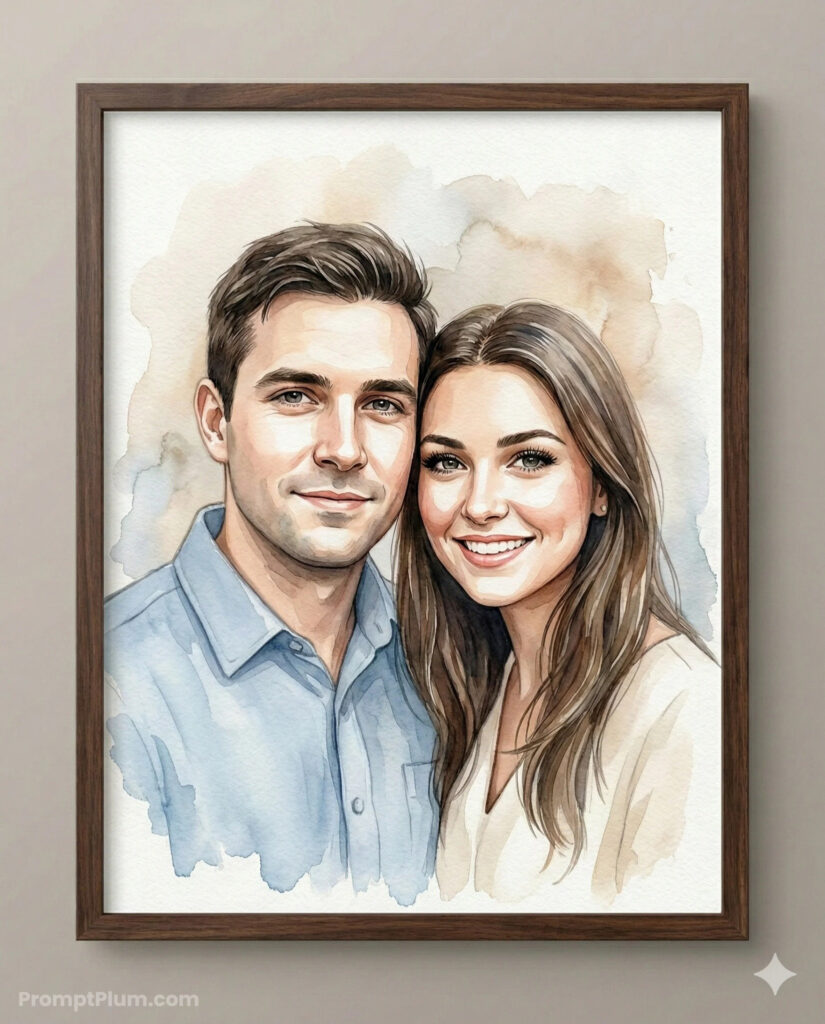 How to Create a Beautiful Watercolor Couple Portrait in Gemini AI (Complete Prompt Guide)
Artificial Intelligence has revolutionized digital art, making it possible to transform ordinary photographs into elegant, gallery-worthy masterpieces. One of the most popular trends is the watercolor couple portrait, a timeless style that combines the softness of traditional watercolor painting with the precision of modern AI image generation.
With the right Gemini AI prompt, you can create a breathtaking watercolor portrait that preserves your facial identity while producing an artwork perfect for framing, gifting, or displaying in your home.
In this comprehensive guide, we’ll explain how the prompt works, why each section matters, and how to get the highest-quality results.
Why Choose a Watercolor Portrait?
Watercolor paintings have a unique charm that digital filters simply cannot replicate. Their soft brush strokes, flowing pigments, subtle textures, and elegant color transitions create an emotional and artistic look.
A watercolor portrait is perfect for:
- Wedding gifts
- Anniversary presents
- Valentine’s Day
- Home wall décor
- Couple portraits
- Family keepsakes
- Social media profile artwork
- Personalized canvas prints
Unlike cartoon effects or heavily stylized AI art, this prompt focuses on creating a realistic watercolor painting while maintaining your true identity.
Why This Gemini Prompt Produces Better Results
Many AI prompts simply say:
“Turn this photo into a watercolor painting.”
Unfortunately, that often leads to:
- Changed facial features
- Incorrect clothing
- Artificial-looking expressions
- Overly saturated colors
- Generic watercolor effects
This advanced prompt eliminates those problems by providing Gemini with highly detailed instructions covering every important aspect of the image.
Upload a High-Quality Reference Photo
Before using the prompt, choose a photo that includes:
✅ Clear faces
✅ Natural lighting
✅ High resolution
✅ Minimal blur
✅ Both people fully visible
The uploaded image is used only as an identity reference, ensuring that your faces remain accurate throughout the artwork.
Complete Gemini Prompt
Copy and paste the following prompt into Gemini after uploading your couple photo.
Use the uploaded image strictly for face and identity reference only. Lock facial identity with the highest priority. Do not beautify, stylize, or alter identity in any way.
Create a 4k resolution, 4:5 aspect ratio, high-quality digitally rendered watercolour-style portrait of a couple, presented inside a dark walnut wooden frame. The artwork must combine precise digital illustration with the soft, fluid characteristics of traditional watercolor painting.
👥 Subject Composition (Strict — Do Not Modify)
Intimate bust portrait, cropped slightly below mid-chest.
Male positioned on the left, female on the right.
Their upper bodies angled very slightly inward toward each other.
Shoulders gently overlapping, with the female subtly leaning into the male’s shoulder for a natural, connected feel.
Heads placed close together with temples nearly touching.
Both faces turned almost straight toward the camera with only a minimal inward rotation (very subtle 5–10° inward angle).
Chin’s level and aligned at a similar height (no exaggerated tilt).
Posture upright but relaxed — not stiff, not exaggerated.
Expressions soft and warm:
Male — calm, subtle, closed-mouth smile.
Female — bright, open smile with gentle warmth.
Eye contact is directed toward the viewer.
No dramatic head tilt. No exaggerated lean. Keep connection natural and balanced.
👕 Adaptive Outfit Detection (Automatic From Reference)
Carefully analyze the uploaded reference image and:
Detect exact clothing type (shirt, blouse, jacket, saree, kurta, suit, casualwear, etc.)
Preserve accurate fabric color, texture, and material type.
Replicate neckline, collar style, sleeve length, layering, and visible accessories.
Maintain realistic folds and garment structure.
Do NOT replace clothing unless explicitly instructed.
Enhance subtle fabric texture slightly for watercolor realism, while keeping authenticity.
🎨 Artistic Style & Watercolor Execution
Medium Simulation:
Blend wet-on-wet soft gradients in background.
Use wet-on-dry precision around facial features.
Allow organic pigment bleeding around edges.
Maintain visible watercolor paper grain texture.
Brushwork Detail:
Fine strokes for eyelashes and individual hair strands.
Controlled detailing around the eyes and lips. Broad translucent washes for clothing.Subtle pigment pooling and natural gradient transitions.
Soft watercolour blooms around the outer edges.
Do NOT over-sharpen or make it look like a digital painting — it must feel like genuine watercolor.
🎨 Color Palette (Adaptive + Balanced)
Maintain accurate skin tones from reference.
Use soft warm neutrals (cream, beige, tan) as base tones. Introduce complementary cool washes when appropriate. Background should remain light, airy, and minimally dominant.
Avoid heavy contrast or overly saturated tones.
💡 Lighting & Depth
Soft, natural, diffused lighting from slightly above and front-facing.
Gentle highlight across forehead, cheekbones, and nose bridge.
Subtle shadow under the jawline and neck area for depth.
No dramatic side-lighting.
High-key, airy atmosphere.
Enhance depth subtly while maintaining watercolor softness.
🖼 Presentation & Framing
Artwork displayed inside a dark walnut or espresso-finished wooden frame.
Modern flat frame profile with subtle wood grain.
No visible matting.
Art extends near edges for a contemporary full-bleed look.
Visible watercolor paper texture inside frame.
Clean neutral wall mockup presentation.
Frame is visible evenly on all four sides with centred wall alignment.
🔧 Slightly Increased Quality Controls (For Better Results)
Increase fine facial detailing by 15–20% while maintaining watercolor softness.
Improve edge control around eyes and lips for clarity. Maintain subtle texture contrast between skin and clothing. Ensure both subjects remain equally sharp and balanced.
Understanding Each Section of the Prompt
1. Identity Lock
The first instruction is one of the most important.
Use the uploaded image strictly for face reference only.
Lock facial identity.
This tells Gemini not to modify facial structure or make cosmetic changes.
It helps preserve:
- Face shape
- Eyes
- Nose
- Smile
- Hairline
- Jawline
- Overall identity
2. Subject Composition
The composition section controls how both people are positioned.
Instead of letting AI guess the arrangement, it specifies:
- Male on the left
- Female on the right
- Slight inward angle
- Natural body posture
- Heads close together
- Relaxed expressions
This creates a balanced and elegant portrait.
3. Adaptive Clothing Detection
Rather than replacing clothing with random outfits, Gemini is instructed to analyze the original image and preserve:
- Shirt style
- Dress
- Saree
- Kurta
- Jacket
- Suit
- Accessories
- Fabric texture
- Collar design
This makes the final portrait feel authentic and personal.
4. Watercolor Painting Style
This section teaches Gemini how watercolor actually behaves.
It includes traditional painting techniques such as:
Wet-on-Wet
Creates soft backgrounds with smooth color blending.
Wet-on-Dry
Keeps facial details sharp while maintaining watercolor softness.
Pigment Bleeding
Allows watercolor edges to flow naturally.
Paper Texture
Adds realistic watercolor paper grain instead of a flat digital background.
5. Balanced Color Palette
The prompt avoids unrealistic colors.
Instead it recommends:
- Cream
- Beige
- Warm browns
- Soft blues
- Gentle neutrals
This produces an elegant painting suitable for home décor.
6. Lighting
Natural lighting is essential.
The prompt requests:
- Soft highlights
- Gentle shadows
- Bright atmosphere
- No dramatic contrast
The result resembles a professionally painted watercolor portrait.
7. Premium Framing
Rather than showing only the artwork, the portrait is displayed inside a premium wooden frame.
The prompt specifies:
- Dark walnut finish
- Modern frame profile
- No mat
- Neutral wall
- Center alignment
This creates a gallery-style presentation suitable for printing or sharing online.
Tips for the Best Results
To maximize image quality:
- Upload a sharp, high-resolution photo.
- Ensure both faces are clearly visible.
- Use natural daylight whenever possible.
- Avoid heavy filters or beauty effects.
- Keep expressions natural.
- Use photos where both subjects are close together.
- Regenerate the image if you’d like slight artistic variations while keeping the same overall style.
Common Mistakes to Avoid
Many users get disappointing results because they:
- Use blurry reference photos.
- Don’t instruct Gemini to preserve identity.
- Forget to specify clothing preservation.
- Ask for multiple art styles at once.
- Use overly saturated color requests.
- Skip framing or presentation details.
A detailed prompt gives Gemini the guidance it needs to produce a polished, realistic result.
Creative Uses for Watercolor Couple Portraits
Once your portrait is generated, you can use it for:
- Canvas wall art
- Anniversary gifts
- Wedding invitations
- Personalized greeting cards
- Valentine’s Day presents
- Digital wallpapers
- Social media profile images
- Family photo albums
- Home office décor
- Printable keepsakes
Final Thoughts
A watercolor portrait is one of the most elegant ways to transform a cherished photograph into timeless artwork. By combining identity preservation, realistic watercolor techniques, adaptive clothing recognition, balanced lighting, and premium framing, this Gemini prompt produces portraits that feel handcrafted while remaining true to the original photo.
Whether you’re creating a romantic keepsake, a wedding gift, or a piece of art for your home, this prompt provides a reliable foundation for generating beautiful, gallery-quality watercolor portraits with Gemini AI.
